Soundef
A downloadable tool for Windows and Linux
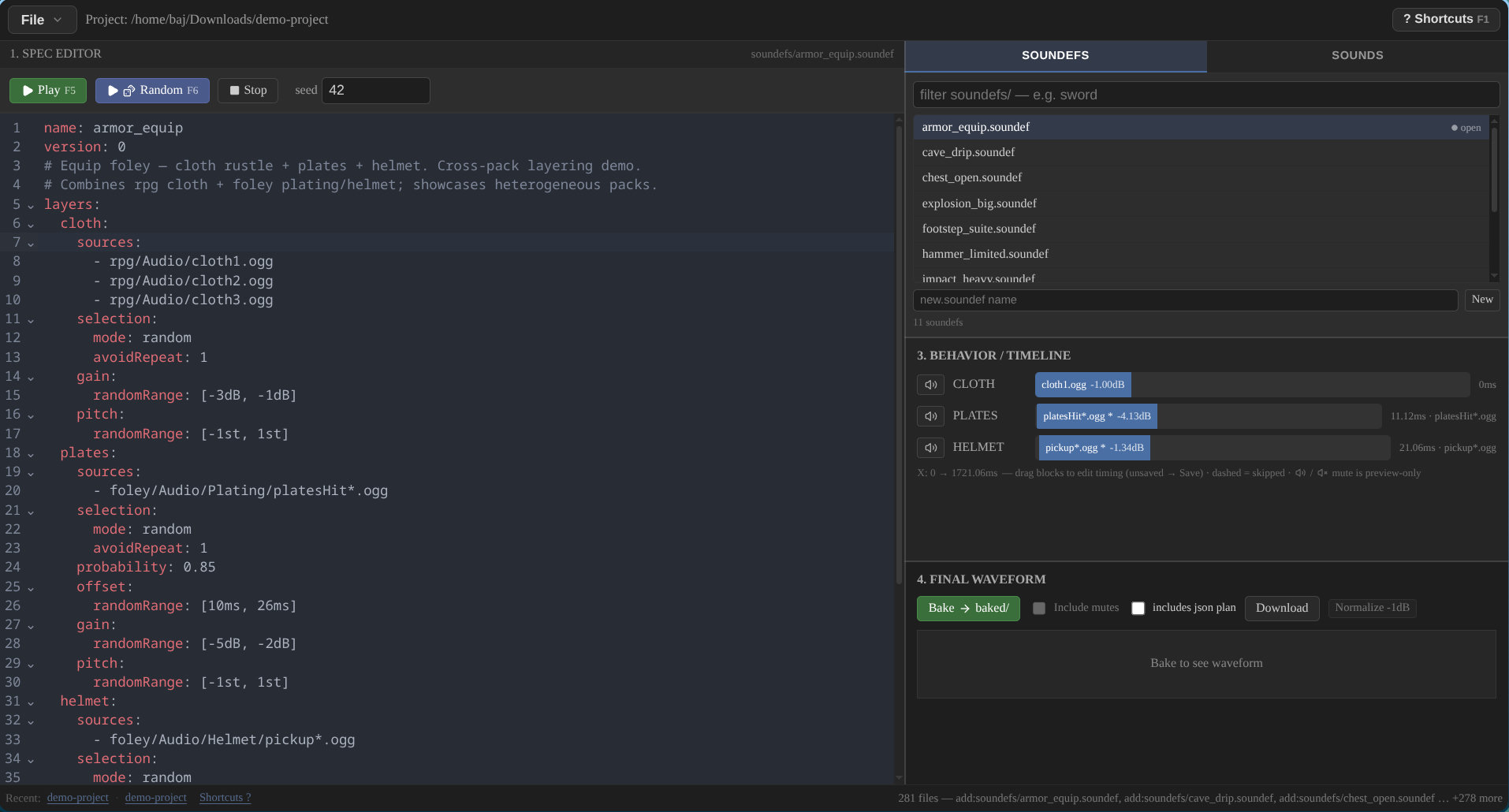
Soundef is a declarative format (.soundef) and Forge, its authoring and preview environment, for interactive game SFX.
Audio files are ingredients. .soundef files are the recipe.
For example, a sword hit can combine a body, a metal ring, and an occasional sparkle, varied on each trigger:
Sword Hit
├── Impact      → random sample + pitch variation
├── Metal       → random sample + timing variation
└── Sweetener   → probability + offset
Soundef is designed for interactive game SFX: footsteps, hits, explosions, UI, foley, vehicles, and more.
It is deliberately focused on sound behavior, not music production or full audio middleware.
The .soundef file is the source of truth: a Dockerfile for sound. Author the recipe once, preview it in Forge, resolve it live in a compatible engine, or bake it into ordinary audio files.
Why
What if you could try ten versions of a hit in a minute? Layer body, metal, and sparkle, vary probability and offset, and keep what you like.
Third parties may implement runtimes for Godot/Unity/Unreal/Bevy; Forge can bake to plain wav so a runtime is never mandatory.
Features
- Layered behavior, not fixed files: stack body, metal, and sparkle, vary on each trigger
- Deterministic: same definition plus same seed gives same result
- Plain text: YAML 1.2, JSON valid, so an LLM can write it without a plugin
- Variation built in: probability, random ranges for gain, pitch and offset, selection with avoidRepeat, and basename globs
- Flexible: render a final wav, generate a plan file, or implement the spec in your engine
What you get
- Forge app for Windows, macOS, Linux - edit, preview, bake
- Demo project with 11 soundefs and sounds - open and press Play
- Schemas plus baked wav fallback - no runtime required to ship sound
Demo sounds
Demo audio is provided by Kenney, from his CC0 game-audio asset packs so you can experiment freely with the included assets.
Kenney — CC0 1.0 Universal.
AI-friendly loop (optional)
Describe in words → LLM writes .soundef → Forge previews on save → nudge a number → repeat
Say "a wet sword clang with a rare high sparkle." An LLM can write the .soundef for you. It is plain YAML 1.2 (JSON is valid too), so models can generate it without a plugin, SDK, or proprietary tool. The model reasons about behavior: which layers, which ranges, which probabilities, not about operating an audio editor.
Forge watches the file. Save it and hear it. If the metal ring at 0.7 is too loud, change one number and trigger again. The same seed always gives the same result, so you can A/B two edits or share a seed and get the same sound tomorrow. You never need an LLM - hand-edit one number and hit Play.
.soundef example (sword_hit)
name: sword_hit
version: 0
layers:
    body:
        sources:
            - swords/body_01.wav
            - swords/body_02.wav
            - swords/body_03.wav
        selection:
        mode: random
        avoidRepeat: 2
        gain: randomRange: [-2dB, 0dB]
        pitch: randomRange: [-2st, 2st]
    metal:
        sources:
            - swords/metal_01.wav
            - swords/metal_02.wav
        selection:
            mode: random
            avoidRepeat: 1
            probability: 0.7
            offset: randomRange: [5ms, 25ms]
            gain: randomRange: [-4dB, -1dB]
            pitch: randomRange: [-1st, 1st]
    sparkle:
        sources:
            - swords/sparkle.wav
        probability: 0.2
        offset: randomRange: [40ms, 90ms]
        gain: randomRange: [-8dB, -4dB]
effects:
    reverb:
    amount: 0.2
See the Spec for the complete file reference.
Project layout
MyProject/               ← your project folder
├── sounds/              ← plain files, never imported
│   ├── swords/
│   └── impacts/
├── soundefs/
│   ├── sword_hit.soundef
│   └── explosion.soundef
└── baked/               ← Forge bake output (gitignored)
Quickstart
File → Open Project…→ pick your project folder (MyProject/in the example above - any name withsounds/+soundefs/siblings).- Edit
.soundefin the Spec editor or use the command palette to insert and play definitions, then tweakgain/pitch/offset. Bake→baked/<name>_baked_<seed>.wavfor A/B vs live, orExport Packto share.
Full loop: Getting Started. Full file reference: Spec. FAQ.
Try it in 60 seconds
- Download Forge below
- Open
examples/demo-projectin Forge - it holdssounds/andsoundefs/side by side - Click
sword_hit→Play→ nudgegain→Playagain. Same seed gives same result.
Links
- Full docs: Getting Started · Spec (file reference) · Examples · Integration (runtimes) · FAQ.
Download
Click download now to get access to the following files: